Why every Android launcher should let users pick icons directly from an icon pack, and which ones still don’t
I’ve been designing Android icon packs for years. I get a lot of emails. Many of them come down to the same complaint:
“I can’t find the icon I want in your pack. Your launcher’s icon list is endless and there’s no search. Is there any way to just open your pack, find the icon, and apply it?”
The honest answer is: yes, there is. It’s a one-line intent that’s been part of Android’s icon pack ecosystem for over a decade. Every modern icon pack already supports it. Some launchers just refuse to implement it.
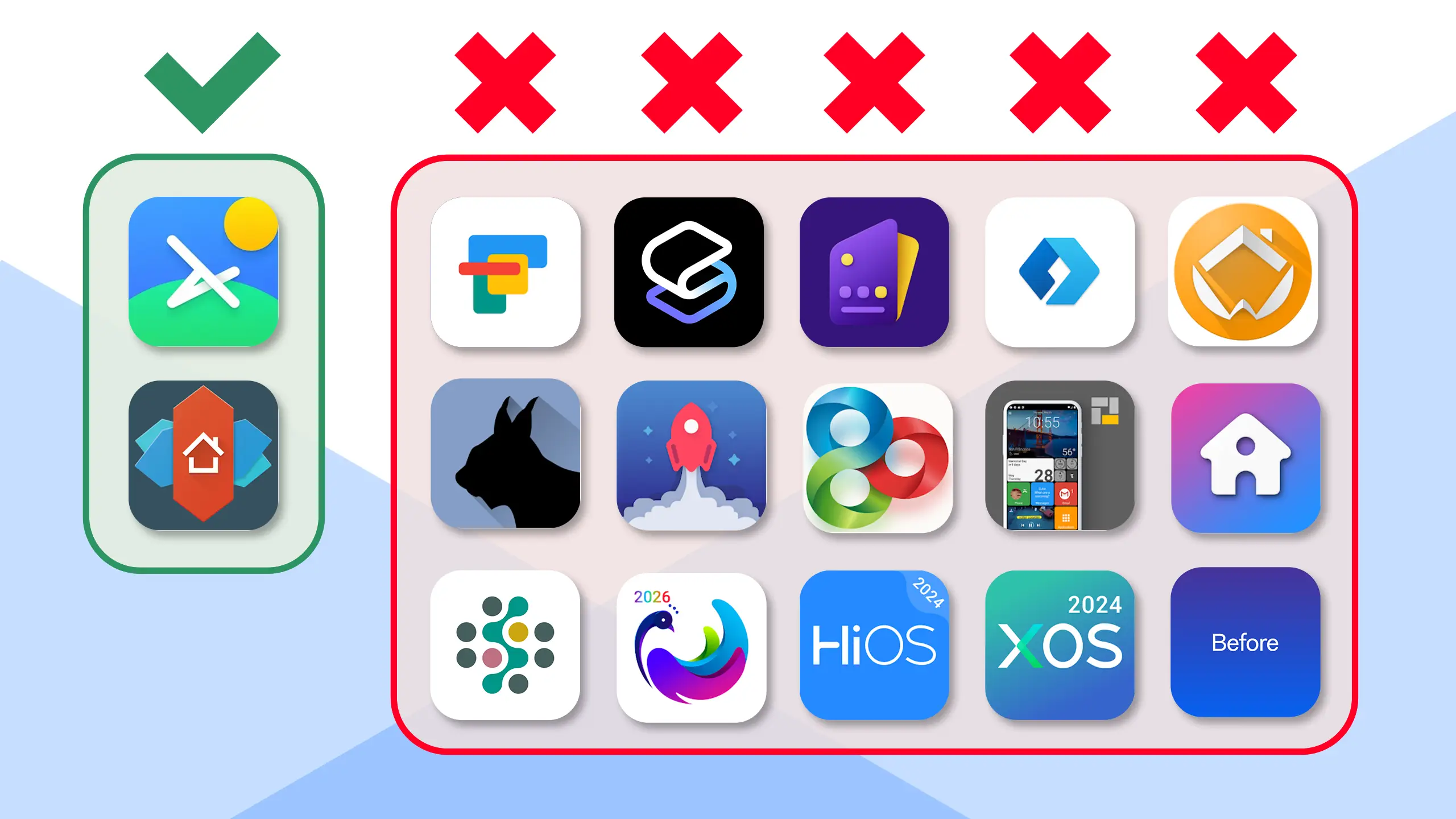
I tested 18 of the top Android launchers on the Play Store. Two of them got it right.
I’ll be the first to admit I’m probably more bothered by this than most people. I design icon packs for a living, so I see this issue from the angle of someone whose whole craft depends on it working. But I don’t think that makes the issue smaller. One of the main draws of Android over every other mobile platform is personalization. The freedom to make your phone look and feel like your phone, with tools made by independent designers, is a huge part of what keeps a lot of people on Android in the first place. When 90% of launchers ship without supporting the standard contract that makes icon packs usable, that’s not a niche complaint from a niche designer. That’s a chunk of Android’s core value proposition broken in plain sight.
This post is for two audiences:
- Users, to explain why the experience is bad on certain launchers and what you can do about it.
- Launcher developers, to show exactly how trivial the fix is, and to make the case for why it should be a priority.
What “Bring Your Own Icon” actually means
When you long-press an app on your home screen and want to change its icon, there are two flows your launcher can offer you:
Flow A: the launcher’s picker. The launcher shows you its own icon list, pulled from your installed icon packs. You scroll through thousands of icons looking for the one you want. Some launchers offer search. Many don’t. If the pack uses non-obvious naming, you’ll never find it.
Flow B: the icon pack’s picker. The launcher hands off to the icon pack itself. The pack opens, shows its own browsable, searchable, categorized UI (which the designer built specifically for this), you pick an icon, and the launcher receives it back and applies it.
Flow B is the experience you actually want. It’s what icon packs are designed for. The pack’s own UI has categories, search, previews, and an organization that reflects the designer’s intent. It’s the difference between rummaging through a giant unsorted bin and walking into an organized store.
Most launchers support Flow A. Far fewer support Flow B.
That’s the gap this post is about.
How Lawnchair Does it
(The right way)
When you manually edit an icon, Lawnchair gives you the option to open the actual icon pack app to browse for an icon there.
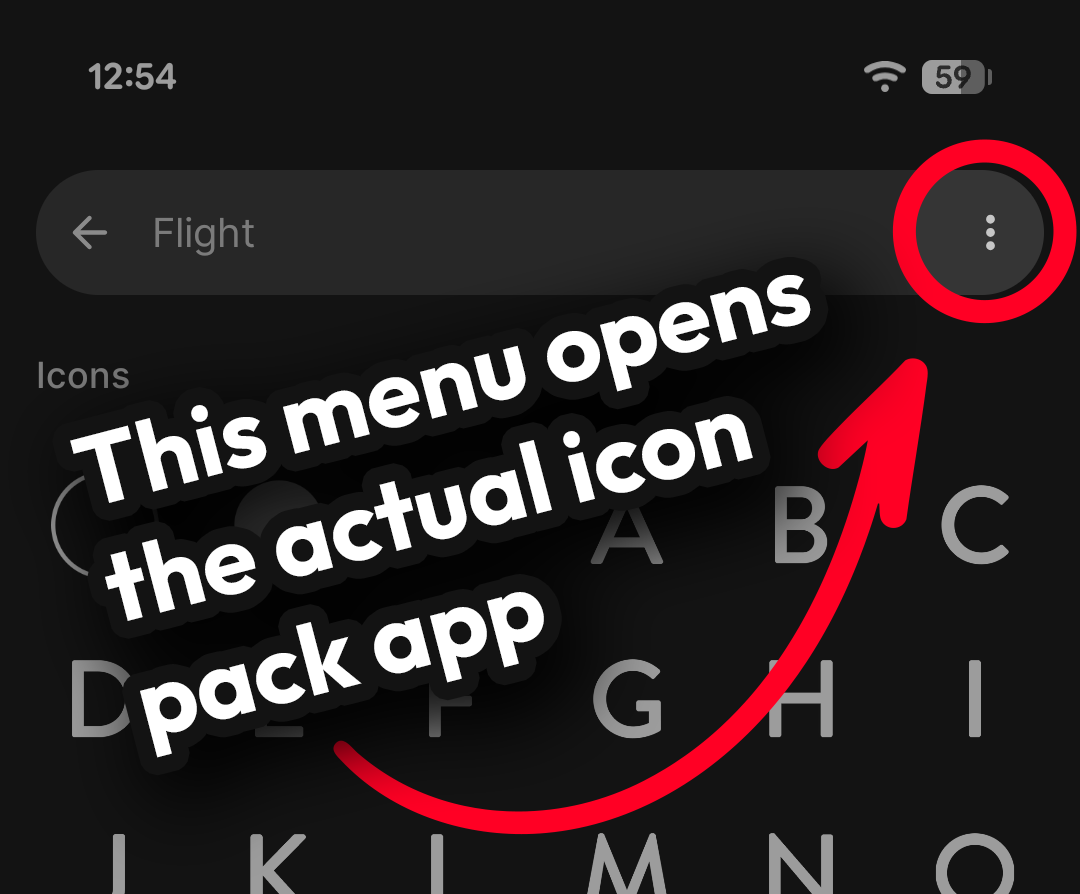
This issue is solved but it’s not implemented
This isn’t a new feature anyone has to invent. It’s been a standard Android contract since 2010, originally established by ADW Launcher. It works like this:
- The launcher queries Android for any installed app declaring a specific intent filter.
- The launcher launches the icon pack’s picker activity.
- The icon pack returns the chosen icon as an
Activityresult. - The launcher applies it.
Every icon pack template on the market, including , , the original ADW template, and , declares the right intent filters out of the box. Conservatively, that means thousands of icon packs on Google Play already support this contract today. They’ve been waiting for the launcher side of the handshake for a decade.
The code
This is the part I want every launcher developer reading this to actually look at. The full launcher-side implementation is roughly twenty-five lines.
Expand for Launcher Dev Code
Step 1: discover installed icon packs.
val packs = packageManager.queryIntentActivities(
    Intent("org.adw.launcher.THEMES").addCategory(Intent.CATEGORY_DEFAULT),
    0
)
Step 2: launch the user’s chosen pack to its picker.
val intent = Intent("org.adw.launcher.icons.ACTION_PICK_ICON")
    .setPackage(chosenPackPackageName)
startActivityForResult(intent, REQ_PICK_ICON)
Step 3: handle the returned icon.
override fun onActivityResult(req: Int, res: Int, data: Intent?) {
    if (req != REQ_PICK_ICON || res != RESULT_OK || data == null) return

    // Preferred form: a drawable resource the launcher can re-render at native density.
    val resource = data.getParcelableExtra(
        Intent.EXTRA_SHORTCUT_ICON_RESOURCE
    )

    // Fallback form: a bitmap (older packs, or fallbacks where a resource isn't available).
    val bitmap = data.getParcelableExtra(Intent.EXTRA_SHORTCUT_ICON)

    // Apply whichever was returned as the override icon for the long-pressed app.
}
That’s it. No new permissions. No external dependencies. Works back to API 21. Compatible with every icon pack on the Play Store that’s been built on a modern template.
A few small notes for implementers:
- The
Intent.EXTRA_SHORTCUT_ICON*constants are deprecated in Android’s modern shortcut APIs, but they remain the established contract for icon pack pickers. Every major template still uses them. This is not a reason to skip implementing the feature. It’s a stable, well-trodden interface used by thousands of apps. - Some packs return an
EXTRA_STREAMURI rather than a raw bitmap, especially on Android 7 and newer where direct bitmap passing runs into FileProvider rules. Handle both forms. setPackage(...)on the request intent is required. Without it, Android opens a chooser instead of going straight to the pack the user picked.- Add a separate intent for Nova’s
com.novalauncher.THEMEwith categorycom.novalauncher.category.CUSTOM_ICON_PICKERif you want to be discovered by every Nova-targeted pack.
References for further reading:
The wall of fame/shame
I tested every major Android launcher I could install. Here’s where they stand as of April 2026.
| Launcher | BYOI Picker | Launcher Search | Notes | Play Store |
|---|---|---|---|---|
 |
|
Best in class. Supports both BYOI and launcher-side search. | ↗ | |
|
 |
Supports BYOI but no internal search. | ↗ | |
|
|
↗ | ||
|
|
↗ | ||
|
|
↗ | ||
|
|
↗ | ||
|
|
↗ | ||
|
|
↗ | ||
|
|
↗ | ||
|
|
↗ | ||
|
|
↗ | ||
|
|
Doesn't even have a launcher-based icon picker. | ↗ | |
|
|
Nearly identical to XOS. Same dev shipping the same launcher under two names. | ↗ | |
|
|
↗ | ||
|
|
↗ | ||
|
|
Has its own theme system. No way to apply icon packs at all. | ↗ | |
|
|
Doesn't work on the latest version of Android. Ironic, given ADW originated this whole standard. | ↗ | |
|
|
Basically unusable in its current state. | ↗ |













Two launchers out of eighteen support the standard. Roughly 90% of launchers tested fail the contract.
Methodology: I installed each launcher fresh, set one of my icon packs as the active pack where applicable, then long-pressed an app on the home screen and looked for an option to change its icon by opening the icon pack’s own picker. I marked Yes if the launcher launched the pack’s picker activity and applied the chosen icon. No if it doesn’t, regardless of whether it offers its own internal icon list. I also noted whether the launcher’s own internal list has a search field, since that’s the only fallback users have when BYOI isn’t supported.
What this data actually shows
A few things stood out to me while testing:
Launcher-side search is not a substitute for BYOI. Six of the launchers that fail the BYOI test do offer a search field in their own icon picker. That’s better than nothing. But it still means the user has to know what the icon is called in the pack’s filename, not what it looks like or what it’s for. A picker built by the icon pack designer is searchable and visually browsable, with categories the designer chose. Search is a band-aid. BYOI is the actual answer.
The launcher that originated the standard no longer works. ADW Launcher, the launcher that defined org.adw.launcher.icons
.ACTION_PICK_ICON and started the whole icon pack ecosystem on Android, no longer runs reliably on modern Android. Nobody picked up the torch.
Two devs are shipping the same launcher under different names. XOS and HiOS appear to be functionally identical apps from the same developer. Neither supports BYOI.
Lawnchair is the only launcher that gets it completely right. It supports both BYOI (Flow B) and launcher-side search (a good fallback when users want to browse without opening the pack). It’s also open source. If you’re a launcher dev wondering what “good” looks like, .
This table is meant to be living. I’ll update it whenever a launcher ships support for the icon pack picker contract, and I’d love nothing more than to delete the “No” column entirely.
What you can do
If you’re a user of a launcher in the No column: leave a Play Store review specifically asking for the feature. Be polite, be specific, link this post if you’d like. Reviews move launcher developers faster than emails do, because reviews are visible to everyone considering the app.
If you’re a launcher developer: the code above is yours to use. If you have questions about which packs are doing what, or want to test against my packs specifically, get in touch. I’d love to move you from one column to the other.
If you’re a fellow icon pack designer: feel free to link this post when answering the same emails I’m getting. The more of us who frame this consistently, the more clearly the message lands.
A note on why this matters
The whole pitch of Android over the alternative is that you can make your phone yours. Icon packs are one of the purest expressions of that. They’re created by independent designers, often as a labor of love, sold for a few dollars or given away free. They make people’s home screens feel personal in a way no platform-supplied default ever will.
When a launcher ships without supporting the icon pack picker contract, it actively breaks the chain between the designer and the user. The user paid for a pack. The designer made a curated, browsable interface for it. The launcher refuses to use it. Everybody loses except the launcher developer’s roadmap.
Twenty-five lines of code. Standard intent. Documented for over a decade. Compatible with thousands of existing apps. Two out of eighteen launchers tested support it.
Ship it.